A branch in Git is simply a lightweight, movable pointer to a specific commit . This allows you to create isolated environments for developing features, fixing bugs, or experimenting without affecting the main codebase . These independent lines of development are fundamental to efficient collaboration .
🔹 Core Concepts
Think of your project’s history as a series of snapshots (commits). A branch points to one of these snapshots. When you make a new commit, the branch pointer automatically moves forward to point to this new commit . You can have multiple branches, each representing a different line of work, all stemming from a common history.
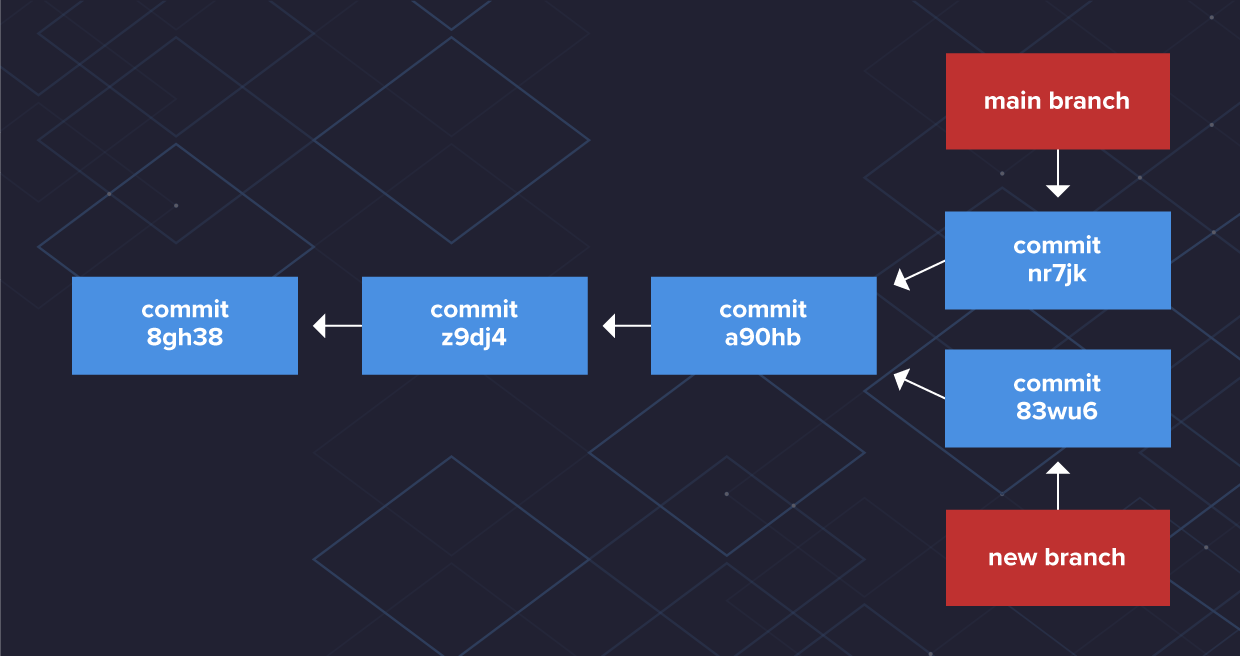 Source: varonis.com
🔹 Code Walkthrough
Here are essential commands with explanations:
# Check your current branch (look for the '*' next to it)
git status

# Create a new branch named 'feature/login' AND switch to it
# The '-c' flag means 'create'
git switch -c feature/login
# Alternative: git checkout -b feature/login

# Make changes to files, then stage and commit them
# These commits will only exist on the 'feature/login' branch
git add .
git commit -m "Add login form structure"

# Push your new local branch to the remote repository (e.g., GitHub)
git push origin feature/login

# Switch back to the main branch
# This updates your working directory to match the 'main' branch state
git switch main

# Pull the latest changes from the remote 'main' branch
git pull origin main

# Merge the completed 'feature/login' branch into 'main'
# This combines the histories
git merge feature/login

# Push the updated 'main' branch (which now includes the merged changes)
git push origin main

# (Optional) Delete the feature branch locally after merging
git branch -d feature/login
🔹 Common Mistakes
- Working on the wrong branch: Always use
git statusbefore starting work to confirm your location. - Large, long-lived branches: These increase the likelihood of complex merge conflicts . Try to keep branches focused and merge frequently.
- Merge Conflicts: Occur when two branches modify the same part of a file. Git cannot decide which change to keep, requiring manual resolution .
- Not pulling latest changes: Merging an outdated
mainbranch into your feature can cause unnecessary conflicts.
🔹 Best Practices
- Use Descriptive Names: Prefix branches based on their purpose, like
feature/,bugfix/, orhotfix/. - Keep Branches Focused: Each branch should address a single task or issue.
- Leverage Pull Requests: Use them for code review before merging into
main. - Choose a Strategy: Adopt a workflow like GitHub Flow or GitLab Flow for team consistency .
- Clean Up: Delete merged branches to reduce clutter.
🔹 Final Thoughts
Understanding that a branch is a lightweight pointer demystifies its power . By mastering basic commands and avoiding common pitfalls, you can effectively manage parallel development streams.